
Why RTOs Should Move Away From Paper-Based Student Records
Learn why paper-based student records create compliance and admin risks for RTOs, and how digital records make student information easier to manage.

Most RTOs have a room full of paperwork, and with AQF certification records to be kept for 30 years, it only fills up. Hardcopy files are slow to search, easy to misfile and hard to keep current as student numbers grow.
For RTOs, the issue goes beyond paper and storage. Poor record management can slow down day-to-day administration and make it harder to produce accurate information under audit or regulator pressure.
Moving student records into a digital system gives RTOs a more controlled way to store, update and access student information.
This guide covers why paper records become a liability as an RTO grows, a step-by-step approach to making the shift, and what to look for in a digital student records system.
The VET Information Standard requires digital data
The VET Information Standard is replacing AVETMISS as the national VET data standard. Under the updated data provision requirements, RTOs must maintain reportable VET data in a digital system and submit it through the required reporting pathway.
For RTOs still relying on paper-based student records, this makes digital record-keeping increasingly important for accurate and efficient data reporting.
Why paper-based student records become a problem
Paper records create several challenges as student numbers and administrative requirements increase.
- Paper records can create compliance risks
RTOs have specific record-keeping obligations under the 2025 Standards. Assessment records must be retained for two years after a student completes the training product, while AQF certification records must be retained for 30 years.
These records must remain accessible and usable throughout the required retention period. When records are stored on paper, RTOs need reliable processes to protect, organise and retrieve them over many years. Lost, damaged or difficult-to-find records can make it harder to produce the required evidence when needed.
- Files can be lost or damaged
Physical documents can be misplaced, filed incorrectly or damaged over time. A document may be sitting in the wrong folder, with another staff member or in a location that is difficult to find.
This becomes particularly frustrating when staff need a specific record to answer a student query or complete an administrative task. A digital record removes much of this physical searching. Staff can search for the student and access the relevant information from one system.
- Student information can become outdated
Student information does not stay the same throughout the training journey. Contact details, enrolment information and other records may need to be updated. With paper records, staff may need to update several documents or copies. This creates opportunities for information to become inconsistent.
Digital systems can reduce this risk at the point of enrolment. RTOPilot’s Smart Verify automatically validates student information as it is entered, reducing manual checks and helping keep records accurate from the start.
- Manual filing takes up staff time
Paper-based record keeping involves more than printing and storing documents. Staff may need to:
- Create and organise files
- Print and scan documents
- Locate records when requested
- File updated information
- Copy documents for other staff
- Check different records against each other
Digital workflows can also reduce repetitive administration. RTOPilot’s Automation & Workflow Management supports processes such as AVETMISS data capture, enrolment, payments and student communication, reducing the need for staff to manage each step manually.
- Finding compliance evidence can take longer
RTOs need to maintain appropriate records and evidence across their training and administrative processes. When information is stored across physical files, finding the right document can take longer.
A missing document or poorly organised file can also make it harder for staff to establish what information is available and where it is stored.
A platform with AVETMISS compliance can check student and training data as it is entered, flag missing or invalid information, and generate reports from the same records. This reduces the need to check and compile information from separate files manually.
The benefits of digital records
- Faster retrieval: A record that's searchable can be produced in seconds rather than located by hand, which matters most under audit pressure when an assessor is asking for a specific student's file on the spot.
- Built-in backup: A digital record doesn't depend on a single physical copy surviving. Backups mean a fire, flood or staff departure can't erase a student's history.
- Fewer errors from duplicate entry: When enrolment, attendance and assessment data live in one system instead of three separate paper trails, the same information doesn't need to be entered and re-entered, which cuts out a common source of mismatched records ahead of AVETMISS reporting.
- Access control and audit trails: Digital systems can restrict who sees what and log every access, which gives an RTO a clear answer when asked how student data is protected, rather than relying on a locked door.
- Time back for the team: Staff hours that went into filing and searching for paper records can go toward training delivery or learner support instead.
How to move from paper records to digital records
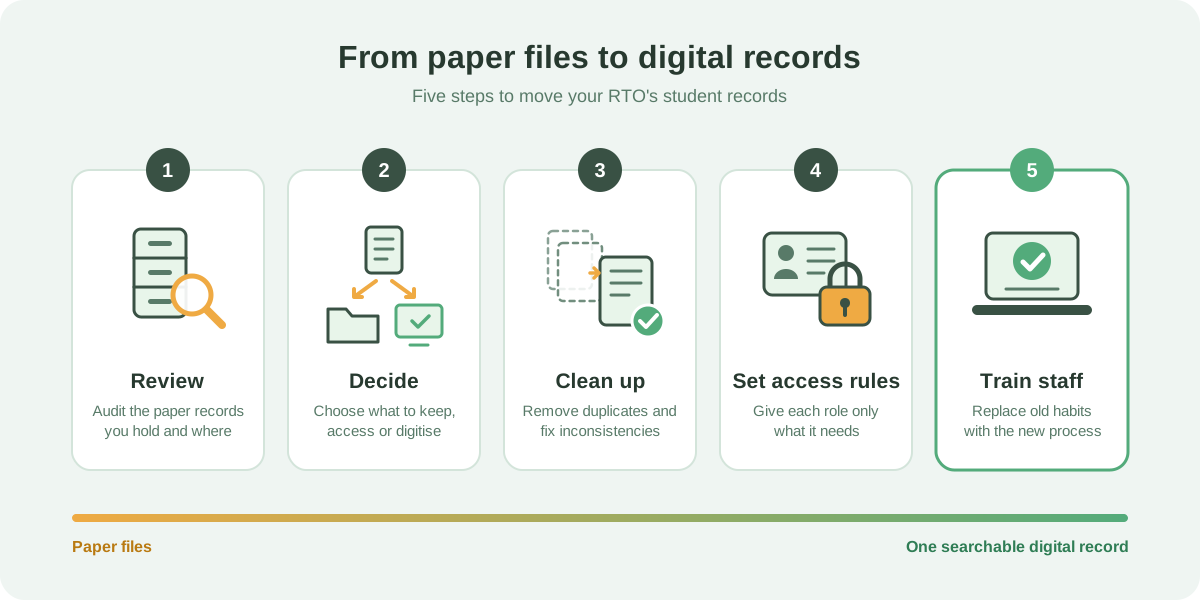
RTOs do not necessarily need to digitise every historical document overnight. A controlled transition can make the process more manageable.
1. Review your existing records
Start by identifying what information is stored on paper and where it is currently kept. This can highlight duplicate records, outdated documents and information that staff regularly struggle to find.
2. Decide what needs to be digitised
Not every piece of paper needs to be treated the same way. Identify the records that need to be retained, accessed regularly or transferred into the new system.
3. Clean up existing information
Use the transition as an opportunity to identify duplicate or inconsistent student records before moving them into the digital system.
4. Set clear access rules
Decide which staff need access to different types of student information. Set roles and permissions before the system becomes part of everyday operations.
5. Train staff on the new process
Staff should know where student information lives, how to update it and how to find records when needed.
The aim is to replace the old filing process rather than create a digital version of the same inefficient workflow.
What should RTOs look for in a digital student records system?
Moving away from paper is only useful if the digital system makes record management more practical. Look for a system that provides:
- Centralised student records: Staff should be able to access the key information associated with a student from one place rather than relying on separate spreadsheets, folders and documents.
- Searchable information: Staff should be able to quickly find a student or record without manually checking through files.
- User permissions: Different staff members may need different levels of access. The system should let the RTO control who can view or change particular information.
- Document management: The system should provide a practical way to store and access relevant student documents alongside the student's record.
- Record history: A clear history of changes can make it easier to understand what has been updated and when.
- Integration with other RTO processes: Student records should connect with the processes staff already manage, such as enrolments, classes, payments, assessments and reporting, through a student management system.
How RTOPilot supports the shift
RTOPilot keeps student records from enrolment through to certification in one system, with Australian-hosted data and automated backups. Records are searchable and available without relying on physical files.
AVETMISS reporting uses the same student data, so the information needed for reporting and audits is already stored in the system rather than spread across separate files.
Ready to move beyond paper-based records? See how RTOPilot can help your RTO manage student records in one place. Book a demo today.
Subscribe to receive the latest blog posts to your inbox every week.

Frequently Asked Questions
Paper records can be lost or destroyed by fire, flood or misfiling; they are difficult to retain reliably over long periods such as the thirty-year certification requirement, and slow down retrieval when a record is needed quickly, such as during an audit.
Assessment evidence for at least two years after a student completes their training product. AQF certification documentation for thirty years. Some records may carry longer periods under state or funding contract requirements.
Yes, technically, but ASQA identifies hardcopy-only storage as a risk and expects records to be protected and reproducible if the originals are lost or destroyed.
Digital copies are allowed where keeping the original isn't practical, provided the copy is clear and complete enough to stand in for it. Check your funding contract too, since some set their own requirements.
Certification records transfer to the incoming owner on a change of ownership, or to ASQA if the organisation stops operating as an RTO.



Is your RTO future-ready?
See how RTOPilot can help.
Designed to help you spend less time and save money in running your RTO.
